MPT-1. Assess Threat Tactics & Techniques + Identify Coverage Gaps
This planning task may be skipped for the sake of rapid deployment at the cost of confidence that you are collecting the correct logs to fully detect you targeted threat.
- All data collection planning artifacts should be saved on the Fileserver SMB Share under
/MISSION/01_PLANNING/02_DATA_COLLECTION_PLAN/for standardization of location and access - Depending on the team's preference, related lists and CSV files can be either saved as individual files or combined as sepearate worksheets in an XLSX workbook
1.1. Identify known MITRE ATT&CK Techniques
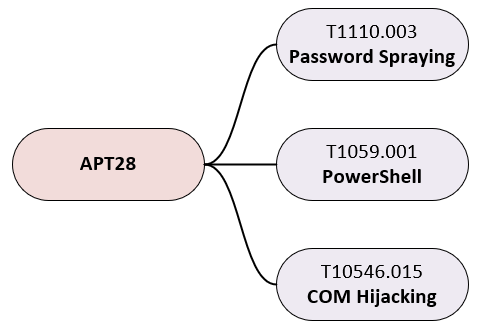
Profile the targeted threat based on available intelligence in order to map their known tactics and techniques
Sub-tasks:
- Create a list of all MITRE ATT&CK techniques that are attributed to the target threat
- Research the threat to identify potential indicator sources not specified by existing MITRE ATT&CK techniques (ie. application specific log files)
| Required Inputs | Expected Outputs |
|---|---|
|
|
threat_techniques.csv | |
|---|---|
| ID | Name |
| T1059.001 | PowerShell |
| T1134.001 | Token Impersonation/Theft |
| T1606.002 | SAML Tokens |
| T1046 | Network Service Discovery |
| T1619 | Cloud Storage Object Discovery |
1.2. Deprioritize irrelevant MITRE ATT&CK Techniques
Prioritize techniques that are actually employable against the mission partner environment and filter out the rest
Sub-tasks:
- Exclude techniques that are not relevant to the environment (ie. remove MacOS techniques for all-Windows environment)
| Required Inputs | Expected Outputs |
|---|---|
|
|
In this example, the techniques T1606.002: SAML Tokens and T1619: Cloud Storage Object Discovery were removed because the monitored network is not a cloud environment.
prioritized_threat_techniques.csv | |
|---|---|
| ID | Name |
| T1059.001 | PowerShell |
| T1134.001 | Token Impersonation/Theft |
| T1046 | Network Service Discovery |
1.3. Identify relavent MITRE ATT&CK Data Components
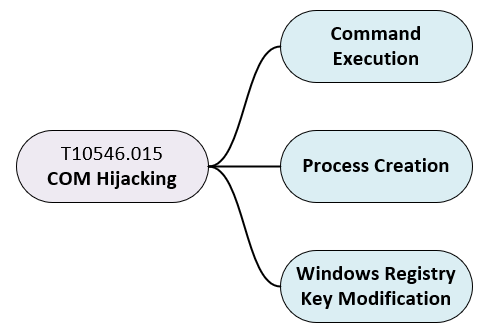
Map prioritized techniques to their corresponding MITRE ATT&CK Data Components
Sub-tasks:
- Translate the prioritized techniques to all the Data Components that can be used to detect them
- Deduplicate the resulting list of Data Components
| Required Inputs | Expected Outputs |
|---|---|
|
|
The ConvertTo-DataComponents.psm1 script can be used to convert a list of Technique IDs to a list of Data Components:
- Copy the
Convert-DataComponents.psm1script (found in\\fileserver\share\share\SCRIPTS\262COS-MITRE_ATTACK_Scripts-PACKAGE-001\) to your Windows host - Open a PowerShell terminal, navigate to the script location, and import the script as a module:
Import-Module -Force .\Convert-DataComponents.psm1 - Run the
Convert-DataComponentsscript against the file containing the list of MITRE ATT&CK technique and sub-technique IDs to convert it to a CSV of matchingData Components:ConvertTo-DataComponents -Techniques ".\technique_list.txt" -Output ".\threat_data_components.csv"
threat_data_components.csv
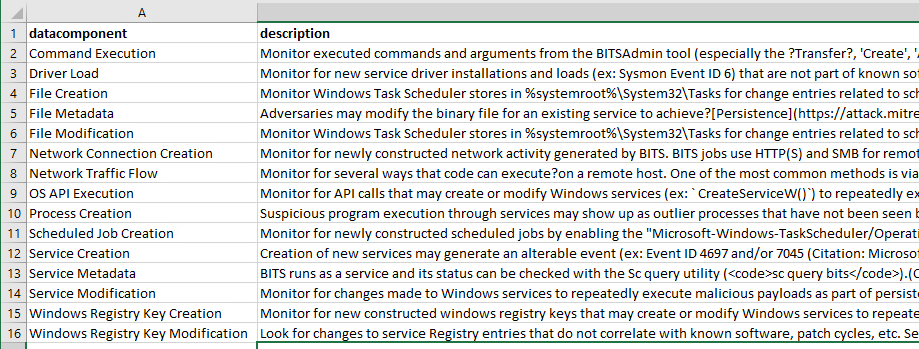
1.4. Identify Data Component coverage gaps
Carefully review the Data Components identified as gaps in order to verify that they are actually needed to detect your specific threat. Remember that the lack of a particular Data Component does not mean that a Technique cannot be detected, and that one or more Data Components can indivudally be used to detect the same Technique.
For example, CVA/H does not natively collect logs relating to the Data Component Cloud Service: Cloud Service Enumeration, which can be used to detect the T1046: Network Sevice Discovery technique - but CVA/H can still detect this Technique using either the Command Execution or Network Traffic Flow Data Component logs, if you are not hunting for a cloud-based threat.
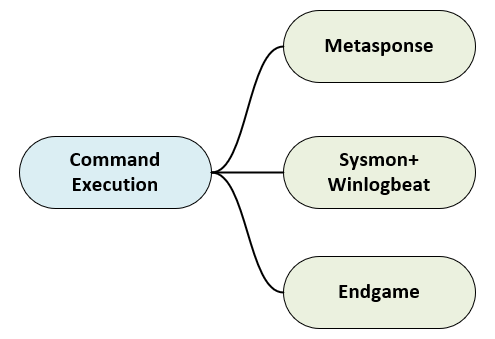
Identify required Data Components that are not collected by CVA/H agents that are commonly deployed (Sysmon, Winlogbeat, Auditbeat, Endgame)
Sub-tasks:
- Refer to the APPENDIX - CVA/H Capability / Data Component Mapping to identify available collection capabilities
- Filter out Data Components that are already covered by the CVA/H capabilities you plan to employ
| Required Inputs | Expected Outputs |
|---|---|
|
|
CVA/H lacks built-in cloud data collection capabilities, so cloud related Data Components will always be a gap (unless a custom ingest to Logstash is engineered) - but it is important understand where your collection will be lacking.
data_component_gaps.csv | |
|---|---|
| datacomponent | description |
| Cloud Service: Cloud Service Metadata | Contextual data about a cloud service and activity around it such as name, type, or purpose/function |
| Cloud Storage: Cloud Storage Metadata | Contextual data about cloud storage infrastructure and activity around it such as name, size, or owner |
| Volume: Volume Metadata | Contextual data about a cloud volume and activity around it, such as id, type, state, and size |
1.5. Identify collection gaps coverable by Filebeat
Application logs, such as web server logs, are often missed by CPTs for collection and can aid in threat detection. Carefully review details about the mission partner network to identify services that may generate file-based logs that could indicate malicious activity.
Identify gaps filled by MRT-C file-based application logs that need to be collected via Filebeat
Sub-tasks:
- Identify required file-based application logs on MRT-C that can aid in threat detection
- Research
Filebeatcapabilities and configurations that would enable the collection of the identified file-based application logs
| Required Inputs | Expected Outputs |
|---|---|
|
|
filebeat_targets.csv | ||||
|---|---|---|---|---|
| Hostname | IP Address | Operating System | Filebeat Module | Log Files |
| WS-03 | 10.0.0.0/24 (DHCP) | RHEL 8 | apache | /path/to/log/apache/access.log* |
| SVR-01 | 10.0.0.10 | Windows Server 2012 R2 | iis | C:\inetpub\logs\LogFiles\W3SVC**.log |
1.6. Identify collection gaps coverable by Syslog forwarding
Although rare, some custom applications may log to Syslog, but not to any file-based logs. Syslog is also commonly used to collect logs from network devices and infrastructure that may not be covered by CVA/H agents.
Identify MRT-C that generate logs that cannot be collected by any CVA/H agent, but are captured by Syslog
Sub-tasks:
- Identify required logging Facilities on mission partner endpoints that cannot be collected by any CVA/H agent
- Research system-specific
Sysloglog forwarding capabilities to plan for reconfiguring to stream back to CVA/H
| Required Inputs | Expected Outputs |
|---|---|
|
|
syslog_targets.csv | ||||
|---|---|---|---|---|
| Hostname | IP Address | Operating System | Syslog Type | |
| WS-03 | 10.0.0.0/24 (DHCP) | RHEL 8 | rsyslog | |
| SW-01 | 10.0.0.254 | Cisco IOS | syslog | |
| FW-01 | 10.0.0.1 | FreeBSD | syslog-ng | |