BACKUP: Export To DIP
262cos_dmip_export_indices.sh is created by 262cos_install_dip_on_mip.sh during installation, and is used to export Elasticsearch indices commonly in use on a CVA/H DIP configured IAW 262COS-DIP-SOP-001.
262cos_dmip_export_indices.sh utilizes elasticdumper.sh (which uses Elasticdump) to dump data from the MIP's Elasticsearch into a JSON file to be re-imported into the DIP's Elasticsearch instance.
The Elasticdump Docker image and elasticdumper.sh script is preloaded on any MIP deployed from a DIP Controller configured IAW 262COS-DIP-SOP-001.
1. Export local MIP Elasticsearch data
-
Ensure the Elasticsearch service (
elasticsearch.service) is started:sudo systemctl start elasticsearch -
Use the
262cos_dmip_export_indices.shscript to export allcvah*index data, Elastic Detection alerts, Arkime, Metasponse, Nmap data to corresponding.jsonfiles:
sudo 262cos_dmip_export_indices.sh
2. Import local MIP Elasticsearch data into the DIP
-
Reconnect the MIP to the DIP network
-
Use
elasticdumper.shto import each exported.jsonfile (cvah.json,alerts.json,arkime.json,metasponse.json,nmap.json):
NOTE: Get the
<DIP_ELASTIC_PASSWORD>from the DIP Controller's TFPlenum "Portal" page for the Kibana service
sudo elasticdumper.sh -u=elastic -p="<DIP_ELASTIC_PASSWORD>" --url="https://elasticsearch.<KIT_DOMAIN>:9200" -i="<JSON_FILE>"
3. Transplant local MIP Arkime PCAP into the DIP
Importing PCAP files into the DIP so that they can be retrieved by the DIP's Arkime is tricky because it requires a DIP Sensor to exist with the same hostname as the original collector (this corresponds to the SENSOR_NAME variable in /cvah/dmip/sensor.cfg) . This is because Arkime's indices in Elasticsearch correlates the data to specific PCAP files for a specific host - you need to deploy a dummy virtual sensor with the same hostname as the SENSOR_NAME variable that was set in /cvah/dmip/sensor.cfg at the time of capture.
-
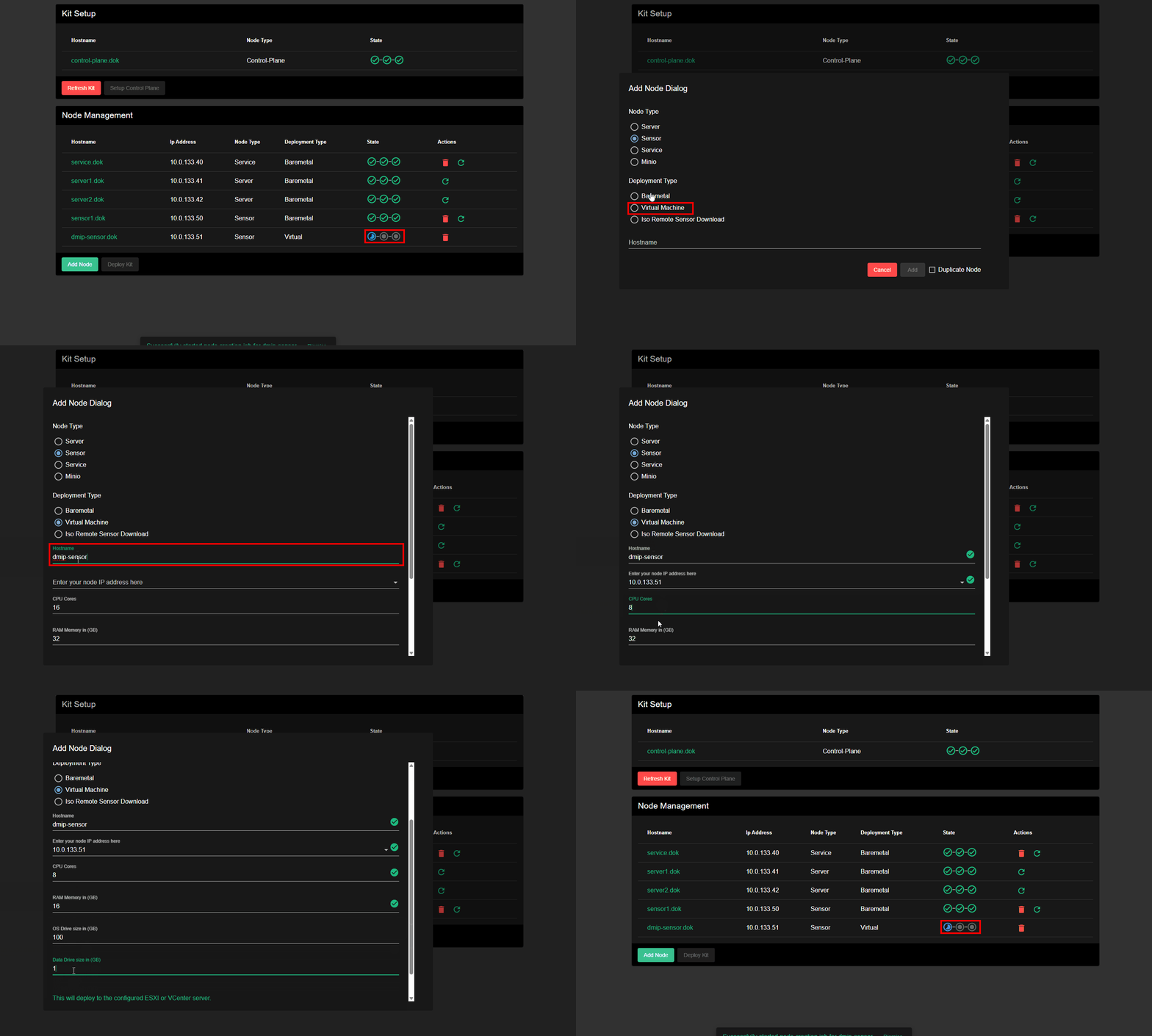
If not already performed, create a Virtual DIP Sensor on from the DIP Controller with the same hostname as the
SENSOR_NAMEvariable that was set in/cvah/dmip/sensor.cfgat the time of capture.NOTE: The default resource settings can be reduced (if you know what you are doing), since the sensor wont actually be used for active sniffing
-
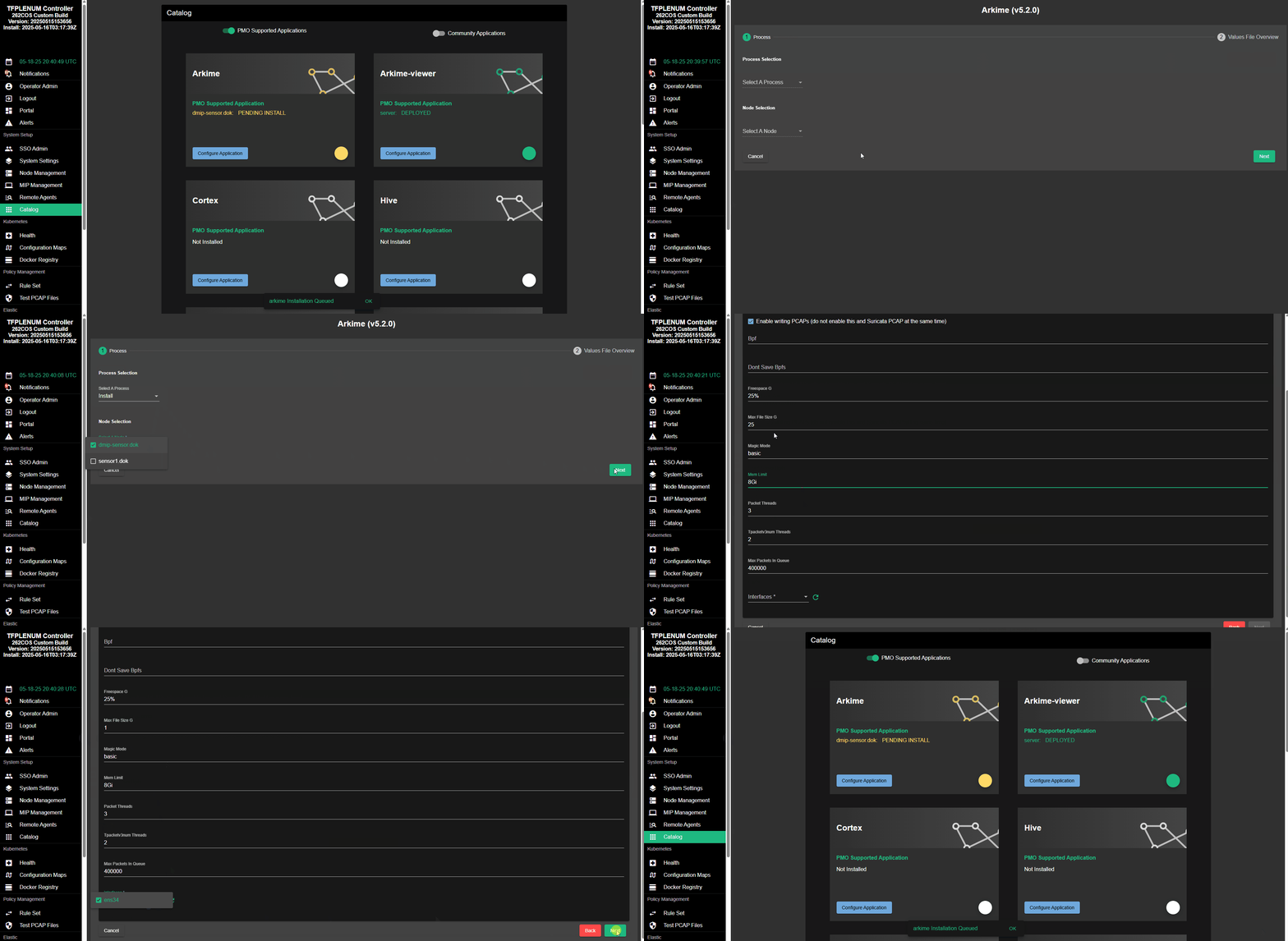
After the new Virtual DIP Sensor is fully deployed (all 3 "state" circles have green checkmarks), install Arkime on it from the DIP Controller "Catalog"
NOTE: The default resource settings can be reduced (if you know what you are doing), since the sensor wont actually be used for active sniffing
-
Stop the sensor services:
warningYou must stop sensor services soth that data may be flushed to log files - this is especially necessary for Arkime-Capture to flush PCAP data from memory to a file, since it normally retains this data in memory until a certain threshold is met.
sudo systemctl stop sensor.target -
Copy relevant PCAP files on the local MIP in
/cvah/dmip/arkime/pcap/<SENSOR_NAME>*to the Virtual DIP Sensor at/data/pcap/:scp -r /cvah/dmip/arkime/pcap/<SENSOR_NAME>* root@<SENSOR_NAME>:/data/pcap/ -
Change the ownership of the new PCAP files on Virtual DIP Sensor so that Arkime can access them:
ssh root@<SENSOR_NAME> chown -R 1000:1000 /data/pcap/