PROCEDURES: Install Agents
These procedures utilize the Deploy-Agent PowerShell module (262COS-CVAH_Agent_Deployer-SCRIPT-001) to deploy agents.
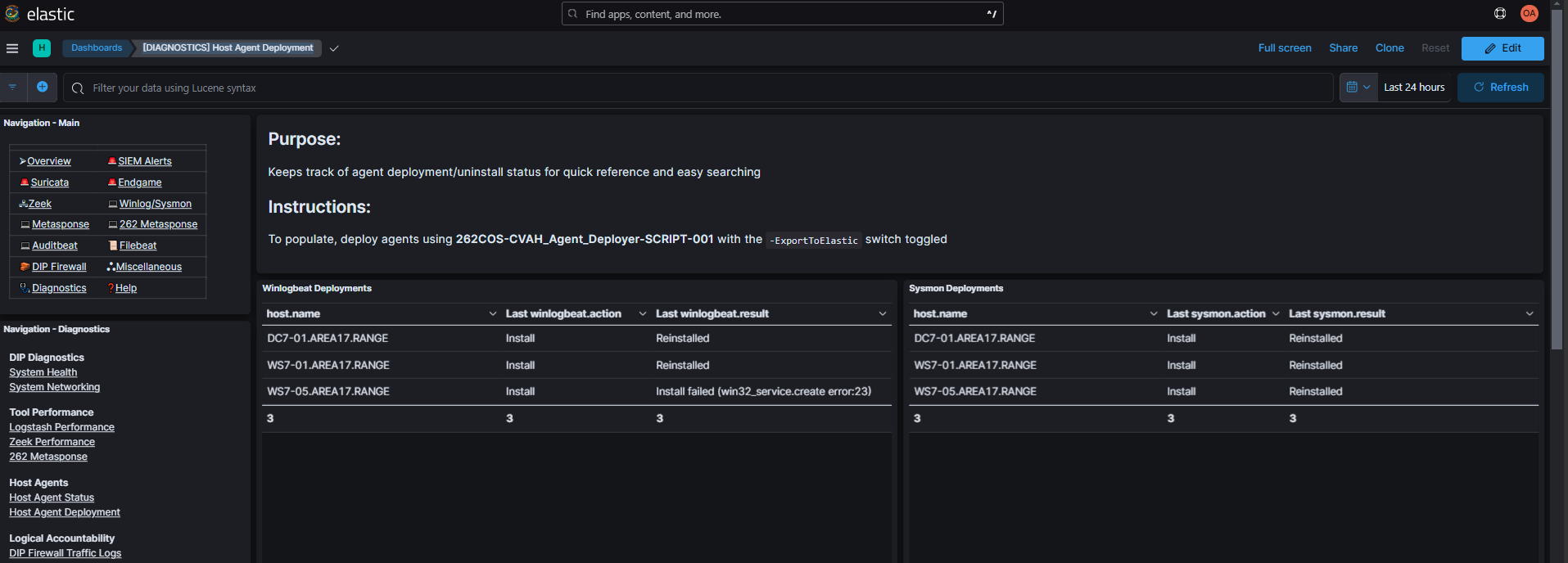
The -ElasticURL $ElasticURL -ElasticPassword $ElasticPassword -ExportToElastic parameters will stream script execution logs to the Elasticsearch agent-deployer index, enabling you to view them in the [DIAGNOSTICS] Host Agent Deployment Kibana dashboard (Diagnostics -> Host Agent Deployment):
Procedures
Copy the content for the corresponding deployment option into your PowerShell_ISE.exe console and populate the required variables (<##########>) with their actual filepaths/values:
- Standard Deployment
- TFPlenum Standard Deployment
- Sysmon
- Endgame
- Winlogbeat
- Filebeat
- Auditbeat
- Metricbeat
Standard Deployment
- The "standard" deployment is considered:
Host Agent Windows Linux Winlogbeat ✅ ❌ Sysmon ✅ ❌ Endgame ✅ ✅
- The
-TFPlenumInstallerZipoption will automatically extract the TFPlenum host agent zip and deploySysmonandWinlogbeat, andEndgameto Windows systems, and onlyEndgameto Linux systems. - The
-TFPlenumInstallerZipexpects a relative path (e.g.agents.zip) and will not work with an absolute path (e.g.C:\Users\...\agents.zip).
Command Template
$ElasticURL="https://elasticsearch.<KIT_DOMAIN>:9200"
$ElasticPassword='<ELASTIC_PASSWORD>'

$SysmonExe="<SYSMON_x86_EXE>"
$Sysmon64Exe="<SYSMON_x86_64_EXE>"
$SysmonConfig="<SYSMON_XML_CONFIG>"

$WinlogbeatExe="<WINLOGBEAT_x86_EXE>"
$Winlogbeat64Exe="<WINLOGBEAT_x86_64_EXE>"
$WinlogbeatConfig="<WINLOGBEAT_YML_CONFIG>"

$EndgameExe="<ENDGAME_WINDOWS_INSTALLER>"
$EndgameBin="<ENDGAME_LINUX_INSTALLER>"
$EndgameWinConfig="<ENDGAME_WINDOWS_CONFIG>"
$EndgameNixConfig="<ENDGAME_LINUX_CONFIG>"
$EndgameAPIKey="<ENDGAME_API_KEY>"

Deploy-Agent -ComputerName $Targets `
    -ElasticURL $ElasticURL -ElasticPassword $ElasticPassword -ExportToElastic `
    -Credential $Credential -SSHCredential $SSHCredential `
    -SysmonExe $SysmonExe -Sysmon64Exe $Sysmon64Exe -SysmonConfig $SysmonConfig `
    -WinlogbeatExe $WinlogbeatExe -Winlogbeat64Exe $Winlogbeat64Exe `
    -WinlogbeatConfig $WinlogbeatConfig`
    -EndgameExe $EndgameExe -EndgameWinConfig $EndgameWinConfig `
    -EndgameBin $EndgameBin -EndgameNixConfig $EndgameNixConfig `
    -EndgameAPIKey $EndgameAPIKey
The hardest part is gethering all the installer materials and typing out their paths
TFPlenum Standard Deployment
- NOTE: "Vanilla" CVA/H *Beats agents are OUTDATED (
v7.16.3as of CVA/H3.8.3) - The "standard" deployment is considered:
Host Agent Windows Linux Winlogbeat ✅ ❌ Sysmon ✅ ❌ Endgame ✅ ✅
- The
-TFPlenumInstallerZipoption will automatically extract the TFPlenum host agent zip and deploySysmonandWinlogbeat, andEndgameto Windows systems, and onlyEndgameto Linux systems. - The
-TFPlenumInstallerZipexpects a relative path (e.g.agents.zip) and will not work with an absolute path (e.g.C:\Users\...\agents.zip).
Command Template
$ElasticURL="https://elasticsearch.<KIT_DOMAIN>:9200"
$ElasticPassword='<ELASTIC_PASSWORD>'
$TFPlenumInstallerZip="<TFPLENUM_HOST_AGENT_INSTALLER_ZIP>"
$EndgameAPIKey="<ENDGAME_API_KEY>"

Deploy-Agent -ComputerName $Targets `
    -ElasticURL $ElasticURL -ElasticPassword $ElasticPassword -ExportToElastic `
    -Credential $Credential -SSHCredential $SSHCredential `
    -TFPlenumInstallerZip $TFPlenumInstallerZip -EndgameAPIKey $EndgameAPIKey
Sysmon
Reinstalling Sysmon multiple times on the same system may eventually cause the service to go into a state where it will not be removed until the machine reboots, preventing reinstallation until a reboot occurs. It is highly recommended to identify if Sysmon is already present, and if it is worth the risk to update the Sysmon install.
Command Template
$ElasticURL="https://elasticsearch.<KIT_DOMAIN>:9200"
$ElasticPassword='<ELASTIC_PASSWORD>'

$SysmonExe="<SYSMON_x86_EXE>"
$Sysmon64Exe="<SYSMON_x86_64_EXE>"
$SysmonConfig="<SYSMON_XML_CONFIG>"

Deploy-Agent -Credential $Credential -ComputerName $Targets `
    -ElasticURL $ElasticURL -ElasticPassword $ElasticPassword -ExportToElastic `
    -SysmonExe $SysmonExe -Sysmon64Exe $Sysmon64Exe -SysmonConfig $SysmonConfig
Endgame
- The
-Credentialoption is used if interacting with Windows hosts and the-SSHCredentialoption is used if interacting with Linux hosts. They can be used together or individually. - The
-EndgameExe/-EndgameWinConfigoptions are used if deploying to Windows hosts and the-EndgameBin/-EndgameNixConfigoptions are used if deploying to Linux hosts. They can be used together or individually.
Command Template
$ElasticURL="https://elasticsearch.<KIT_DOMAIN>:9200"
$ElasticPassword='<ELASTIC_PASSWORD>'

$EndgameExe="<ENDGAME_WINDOWS_INSTALLER>"
$EndgameBin="<ENDGAME_LINUX_INSTALLER>"
$EndgameWinConfig="<ENDGAME_WINDOWS_CONFIG>"
$EndgameNixConfig="<ENDGAME_LINUX_CONFIG>"
$EndgameAPIKey="<ENDGAME_API_KEY>"

Deploy-Agent -ComputerName $Targets `
    -ElasticURL $ElasticURL -ElasticPassword $ElasticPassword -ExportToElastic `
    -Credential $Credential -SSHCredential $SSHCredential `
    -EndgameExe $EndgameExe -EndgameWinConfig $EndgameWinConfig `
    -EndgameBin $EndgameBin -EndgameNixConfig $EndgameNixConfig `
    -EndgameAPIKey $EndgameAPIKey
Winlogbeat
Command Template
$ElasticURL="https://elasticsearch.<KIT_DOMAIN>:9200"
$ElasticPassword='<ELASTIC_PASSWORD>'

$WinlogbeatExe="<WINLOGBEAT_x86_EXE>"
$Winlogbeat64Exe="<WINLOGBEAT_x86_64_EXE>"
$WinlogbeatConfig="<WINLOGBEAT_YML_CONFIG>"

Deploy-Agent -Credential $Credential -ComputerName $Targets `
    -ElasticURL $ElasticURL -ElasticPassword $ElasticPassword -ExportToElastic `
    -WinlogbeatExe $WinlogbeatExe -Winlogbeat64Exe $Winlogbeat64Exe `
    -WinlogbeatConfig $WinlogbeatConfig
Filebeat
- The
-Credentialoption is used if interacting with Windows hosts and the-SSHCredentialoption is used if interacting with Linux hosts. They can be used together or individually. - The
-FilebeatExe/-Filebeat64Exeoptions are used if deploying to Windows hosts and the-FilebeatBin/-Filebeat64Binoptions are used if deploying to Linux hosts. The Linux and Windows options can be used together or individually/separately. - The
-FilebeatModulesoption should be used during installation if the Filebeat config references the use of a module.
Command Template
$ElasticURL="https://elasticsearch.<KIT_DOMAIN>:9200"
$ElasticPassword='<ELASTIC_PASSWORD>'

$FilebeatExe="<FILEBEAT_x86_EXE>"
$Filebeat64Exe="<FILEBEAT_x86_64_EXE>"
$FilebeatBin="<FILEBEAT_x86_RPM/DEB>"
$Filebeat64Bin="<FILEBEAT_x86_64_RPM/DEB>"
$FilebeatConfig="<FILEBEAT_YML_CONFIG>"

Deploy-Agent -ComputerName $Targets `
    -ElasticURL $ElasticURL -ElasticPassword $ElasticPassword -ExportToElastic `
    -Credential $Credential -SSHCredential $SSHCredential `
    -FilebeatExe $FilebeatExe -Filebeat64Exe $Filebeat64Exe `
    -FilebeatExe $FilebeatBin -Filebeat64Exe $Filebeat64Bin `
    -FilebeatConfig $FilebeatConfig
Auditbeat
- The
-Credentialoption is used if interacting with Windows hosts and the-SSHCredentialoption is used if interacting with Linux hosts. They can be used together or individually. - The
-AuditbeatExe/-Auditbeat64Exeoptions are used if deploying to Windows hosts and the-AuditbeatBin/-Auditbeat64Binoptions are used if deploying to Linux hosts. The Linux and Windows options can be used together or individually/separately.
Command Template
$ElasticURL="https://elasticsearch.<KIT_DOMAIN>:9200"
$ElasticPassword='<ELASTIC_PASSWORD>'

$AuditbeatExe="<AUDITBEAT_x86_EXE>"
$Auditbeat64Exe="<AUDITBEAT_x86_64_EXE>"
$AuditbeatBin="<AUDITBEAT_x86_RPM/DEB>"
$Auditbeat64Bin="<AUDITBEAT_x86_64_RPM/DEB>"
$AuditbeatConfig="<AUDITBEAT_YML_CONFIG>"

Deploy-Agent -ComputerName $Targets `
    -ElasticURL $ElasticURL -ElasticPassword $ElasticPassword -ExportToElastic `
    -Credential $Credential -SSHCredential $SSHCredential `
    -AuditbeatExe $AuditbeatExe -Auditbeat64Exe $Auditbeat64Exe `
    -AuditbeatExe $AuditbeatBin -Auditbeat64Exe $Auditbeat64Bin `
    -AuditbeatConfig $AuditbeatConfig
Metricbeat
- The
-Credentialoption is used if interacting with Windows hosts and the-SSHCredentialoption is used if interacting with Linux hosts. They can be used together or individually. - The
-MetricbeatExe/-Metricbeat64Exeoptions are used if deploying to Windows hosts and the-MetricbeatBin/-Metricbeat64Binoptions are used if deploying to Linux hosts. The Linux and Windows options can be used together or individually/separately.
Command Template
$ElasticURL="https://elasticsearch.<KIT_DOMAIN>:9200"
$ElasticPassword='<ELASTIC_PASSWORD>'

$MetricbeatExe="<METRICBEAT_x86_EXE>"
$Metricbeat64Exe="<METRICBEAT_x86_64_EXE>"
$MetricbeatBin="<METRICBEAT_x86_RPM/DEB>"
$Metricbeat64Bin="<METRICBEAT_x86_64_RPM/DEB>"
$MetricbeatConfig="<METRICBEAT_YML_CONFIG>"

Deploy-Agent -ComputerName $Targets `
    -ElasticURL $ElasticURL -ElasticPassword $ElasticPassword -ExportToElastic `
    -Credential $Credential -SSHCredential $SSHCredential `
    -MetricbeatExe $MetricbeatExe -Metricbeat64Exe $Metricbeat64Exe `
    -MetricbeatExe $MetricbeatBin -Metricbeat64Exe $Metricbeat64Bin `
    -MetricbeatConfig $MetricbeatConfig