PROCEDURES: Certificate Update
These procedures utilize the Deploy-Agent PowerShell module (262COS-CVAH_Agent_Deployer-SCRIPT-001) to deploy agents.
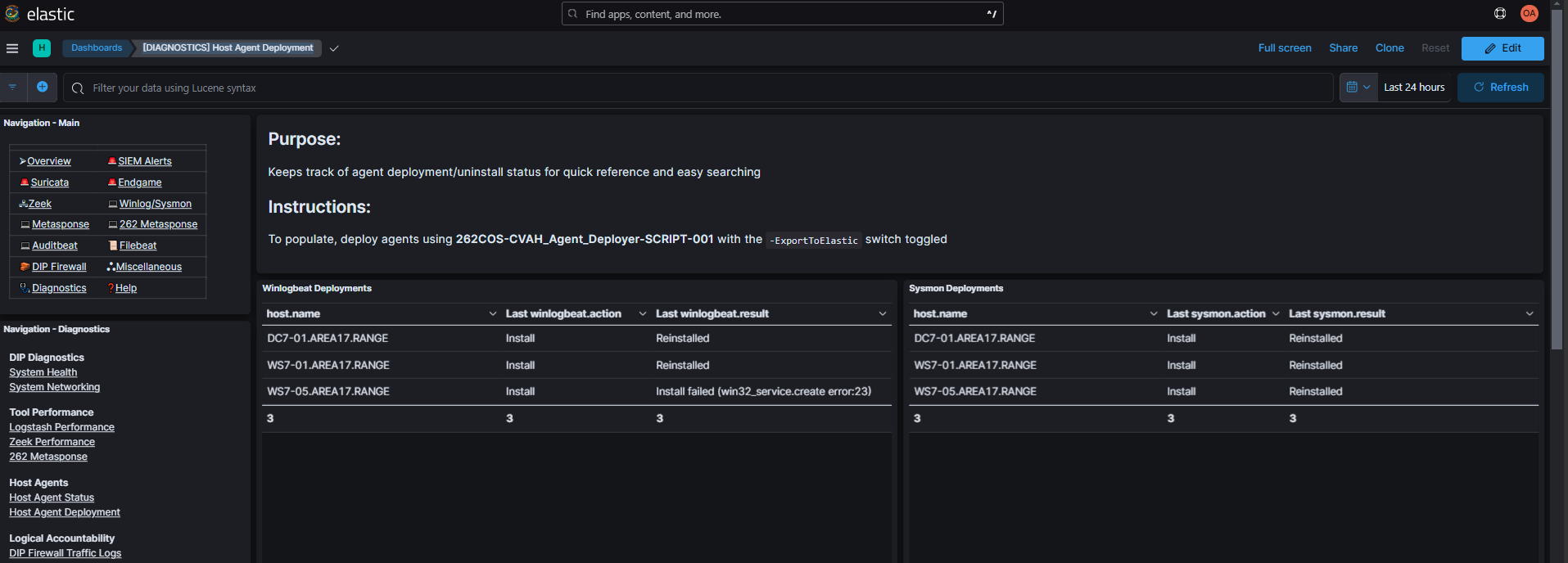
The -ElasticURL $ElasticURL -ElasticPassword $ElasticPassword -ExportToElastic parameters will stream script execution logs to the Elasticsearch agent-deployer index, enabling you to view them in the [DIAGNOSTICS] Host Agent Deployment Kibana dashboard (Diagnostics -> Host Agent Deployment):
Procedures
Copy the content for the corresponding deployment option into your PowerShell_ISE.exe console and populate the required variables (<##########>) with their actual filepaths/values:
Winlogbeat
The CA certificate, TLS certificate, or TLS key can be individually updated, but the CA certificate is required to be provided in any combination.
Command Template
$ElasticURL="https://elasticsearch.<KIT_DOMAIN>:9200"
$ElasticPassword='<ELASTIC_PASSWORD>'

$WinlogbeatCACert="<WINLOGBEAT_CA_CRT>"
$WinlogbeatTLSCert="<WINLOGBEAT_TLS_CRT>"
$WinlogbeatTLSKey="<WINLOGBEAT_TLS_KEY>"

Deploy-Agent -Credential $Credential -ComputerName $Targets `
    -ElasticURL $ElasticURL -ElasticPassword $ElasticPassword -ExportToElastic `
    -WinlogbeatCACert $WinlogbeatCACert `
    -WinlogbeatTLSCert $WinlogbeatTLSCert `
    -WinlogbeatTLSKey $WinlogbeatTLSKey
Filebeat
The CA certificate, TLS certificate, or TLS key can be individually updated, but the CA certificate is required to be provided in any combination.
Command Template
$ElasticURL="https://elasticsearch.<KIT_DOMAIN>:9200"
$ElasticPassword='<ELASTIC_PASSWORD>'

$FilebeatCACert="<FILEBEAT_CA_CRT>"
$FilebeatTLSCert="<FILEBEAT_TLS_CRT>"
$FilebeatTLSKey="<FILEBEAT_TLS_KEY>"

Deploy-Agent -ComputerName $Targets `
    -ElasticURL $ElasticURL -ElasticPassword $ElasticPassword -ExportToElastic `
    -Credential $Credential -SSHCredential $SSHCredential `
    -FilebeatCACert $FilebeatCACert `
    -FilebeatTLSCert $FilebeatTLSCert `
    -FilebeatTLSKey $FilebeatTLSKey
Auditbeat
The CA certificate, TLS certificate, or TLS key can be individually updated, but the CA certificate is required to be provided in any combination.
Command Template
$ElasticURL="https://elasticsearch.<KIT_DOMAIN>:9200"
$ElasticPassword='<ELASTIC_PASSWORD>'

$AuditbeatCACert="<AUDITBEAT_CA_CRT>"
$AuditbeatTLSCert="<AUDITBEAT_TLS_CRT>"
$AuditbeatTLSKey="<AUDITBEAT_TLS_KEY>"

Deploy-Agent -ComputerName $Targets `
    -Credential $Credential -SSHCredential $SSHCredential `
    -ElasticURL $ElasticURL -ElasticPassword $ElasticPassword -ExportToElastic `
    -AuditbeatCACert $AuditbeatCACert `
    -AuditbeatTLSCert $AuditbeatTLSCert `
    -AuditbeatTLSKey $AuditbeatTLSKey
Metricbeat
The CA certificate, TLS certificate, or TLS key can be individually updated, but the CA certificate is required to be provided in any combination.
Command Template
$ElasticURL="https://elasticsearch.<KIT_DOMAIN>:9200"
$ElasticPassword='<ELASTIC_PASSWORD>'

$MetricbeatCACert="<METRICBEAT_CA_CRT>"
$MetricbeatTLSCert="<METRICBEAT_TLS_CRT>"
$MetricbeatTLSKey="<METRICBEAT_TLS_KEY>"

Deploy-Agent -ComputerName $Targets `
    -Credential $Credential -SSHCredential $SSHCredential `
    -ElasticURL $ElasticURL -ElasticPassword $ElasticPassword -ExportToElastic `
    -MetricbeatCACert $MetricbeatCACert `
    -MetricbeatTLSCert $MetricbeatTLSCert `
    -MetricbeatTLSKey $MetricbeatTLSKey