ANALYSIS: Network Flow Inventory
Kibana Dashboard: [INVENTORY] Flows
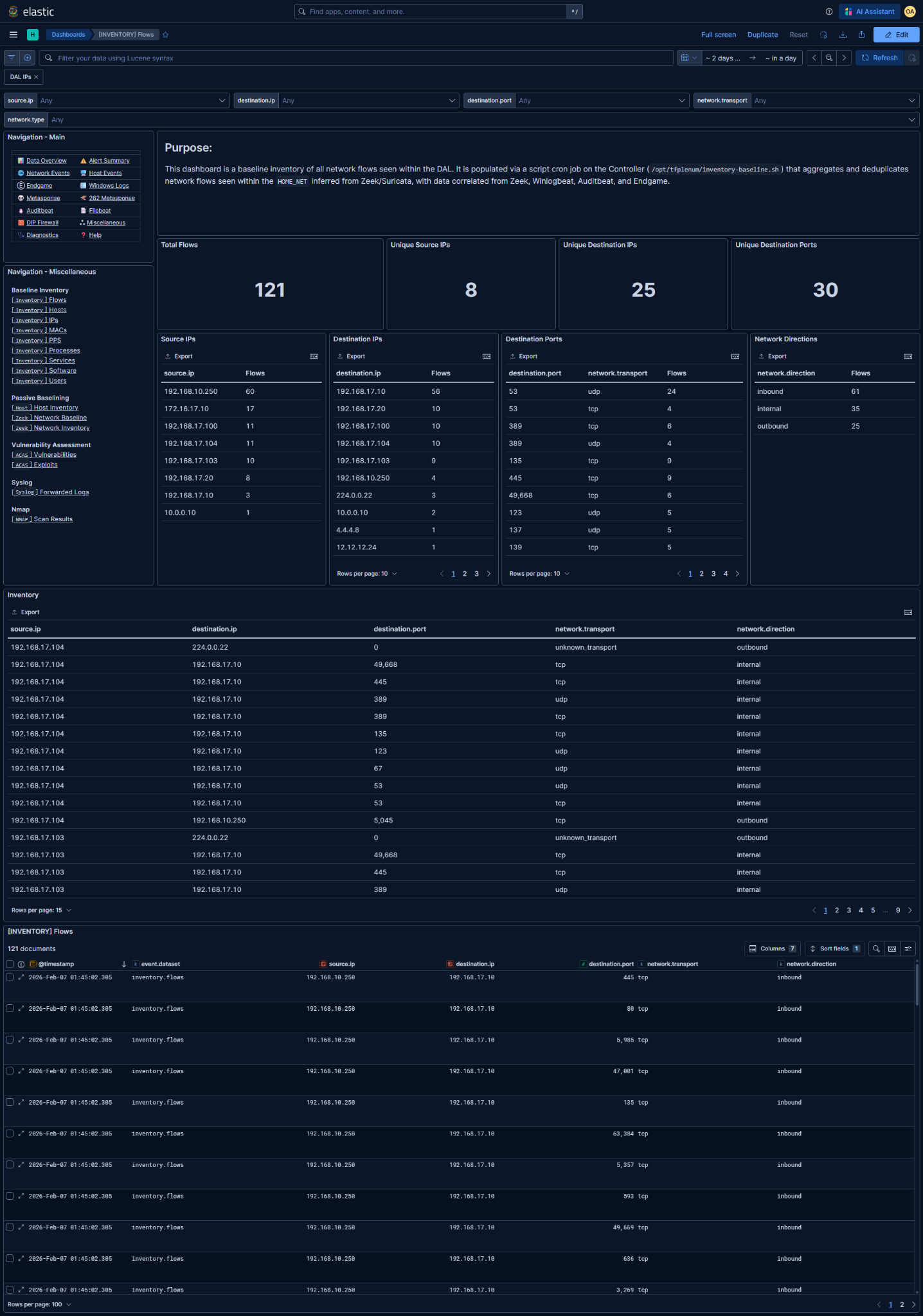
What is this baseline?
The associated Kibana dashboard represents the deduplicated set of network flow tuples observed within the DAL.
- A flow is defined as:
source.ipdestination.ipdestination.portnetwork.transportnetwork.direction(from the perspective of the DAL)
- Each row answers:
"Has this exact flow ever been observed during the baseline window?"
- This is not NetFlow:
- No session counts
- No byte/packet volumes
- No timing or duration
- Presence-only semantics
- A single observed event is enough to place a flow in the baseline.
- From Zeek logs, only successful connections are counted as a flow.
- Entries are deduplicated by flow tuple
@timestampsignifies when it was last observed- A flow seen once early in the window is equivalent to one seen moments ago
Data Prerequisites
If any of these are missing or incorrect, the baseline is unreliable.
1. DAL / HOME_NET must be correct
- Derived from Zeek and/or Suricata
HOME_NET - Used to:
- Filter entries into the inventory
- Infer
network.direction(internal,inbound,outbound,external)
- Incorrect DAL → incorrect directionality → incorrect analysis
2. Required telemetry sources (at least one)
- Zeek
conn.log(preferred) - Sysmon Event ID
3 - Auditbeat
socket - Endgame network telemetry
NOTE: More sources = more complete baseline. Missing sources = blind spots.
Basic Analysis Workflow
1. Baseline sanity check
Before threat analysis, verify the shape of the data:
- Internal ↔ internal flows dominate
- Inbound flows align with known servers
- Outbound flows match expected egress behavior
2. Long-tail analysis (primary value)
Focus on rare entries
- Sort ascending by flow count in:
source.ipdestination.ipdestination.port
- Prioritize:
- High or unusual ports
- External IPs with single-digit flows
- Inbound flows to non-server hosts
Key questions
- Admin or maintenance activity?
- Scanning?
- One-off tooling?
- Potential beaconing?
Validate findings
- Investigate anomalies and verify conclusions
3. Direction-specific review
Internal
- Noisy but useful for lateral movement baselines
- Rare internal ports or uncommon host pairings matter
Inbound
- Should be well understood
- Any inbound flow to an unexpected host is suspicious
Outbound
- Highest signal category
- Rare destinations or ports are prime investigation targets
4. Export for reporting and diffing
Reporting and documentation requirements are determined by the Mission Element Lead/Crew Lead
Common exports
- Full Inventory table (CSV)
NOTE: These exports represent the declared baseline for the mission period.
5. Enable baseline deviation detection rule
Enabling too early guarantees noise - it will alert on ALL new inventory additions after enablement.
Detection rules can be managed in Kibana under Security → Rules
Rule: [262][Inventory] Inbound flow to new destination IP/port pair added to baseline
- Detection logic:
Alert when an inbound flow to a new destination IP/port pair within the DAL was added to the baseline inventory
- Only enable after:
- Baseline window is complete
- Hosts and sensors are stable
- Long-tail review is finished
- Ongoing alert tuning:
- Whitelist alerts with flows missed during baseline
- Suppress known admin or maintenance behavior
This rule is intended to catch:
- Inbound connections from unexpected sources