5. Report Generation
The type of report that you should generate depends on your intent of how the information will be used or what information you want to convey. This section outlines the most common use-case reports.
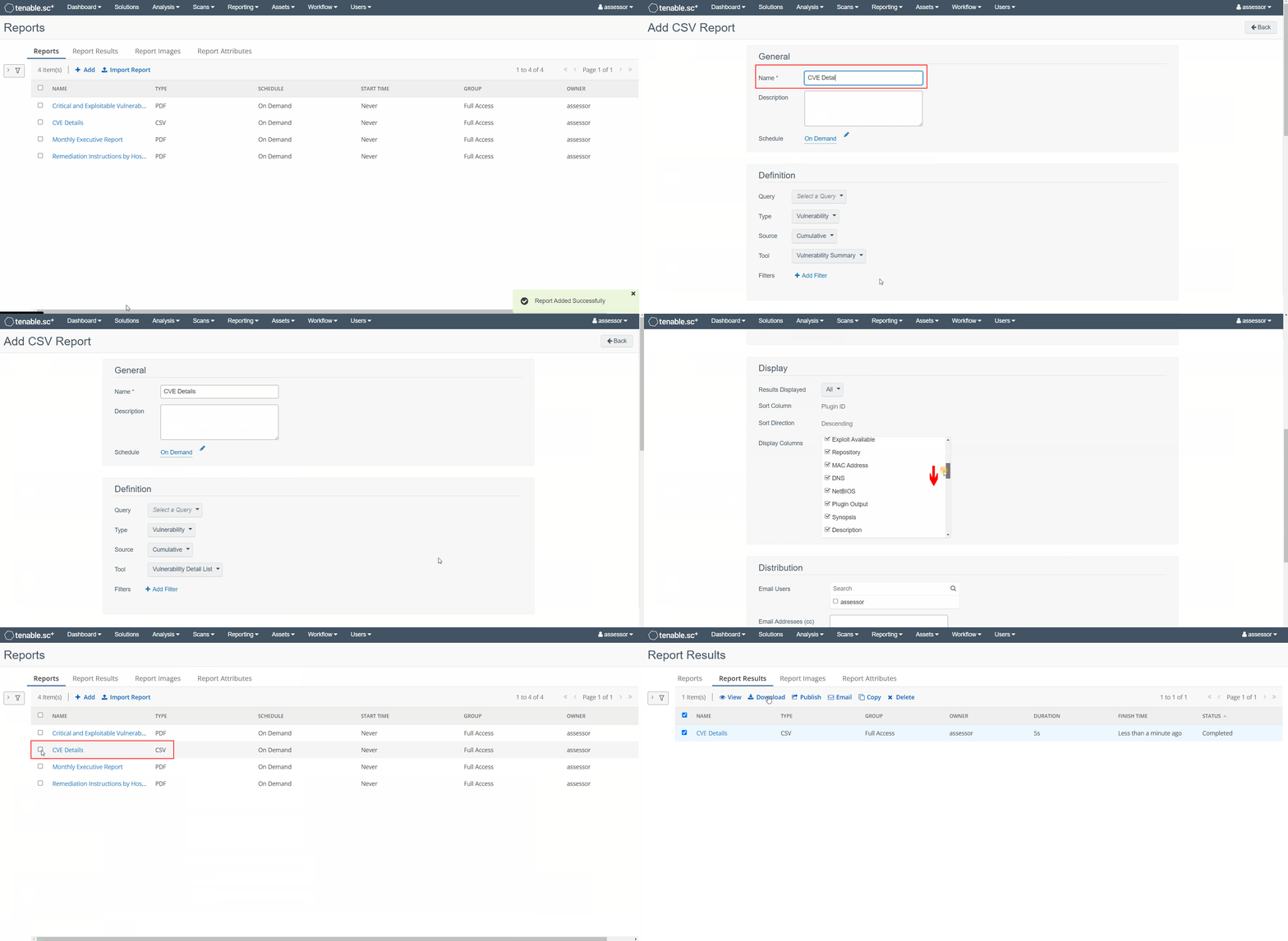
CSV List of all CVE details per IP
-
From the top menu bar navigate to
Reporting -> Reportsand click +Add -
Under the Other section select
CSV -
Set a Name for the report
-
Under the Definition section set:
- Tool:
Vulnerability Detail List
- Tool:
-
Under the Display section set:
- Results Displayed:
All - Display Columns:
Select All, and deselectPlugin Output
noteThe
Plugin Outputcolumn is disabled because Security Center does not sanitize newline characters within it, resulting in CSV with erroneous formatting - Results Displayed:
-
Click Submit
-
Select the report you just created and press the
⯈ Launchbutton -
From the top menu bar navigate to
Reporting -> Report Results -
Click on the report you just generated to download it
PDF Compliance & Configuration Reports
-
From the top menu bar navigate to
Reporting -> Reportsand click +Add -
Under the Templates section select Compliance & Configuration Assessment
-
Select the any of the following templates that suit your reporting needs:
-
Template:
System Configuration Report- Not compliance related, but provides a baseline of: detected operating systems, installed software, and other system information
-
Template:
Compliance Summary- Lists non-compliance results per framework
- Deselect all irrelevant frameworks when creating
-
Template:
STIG Report (by MAC)- Lists STIG non-compliance results grouped by Mission Assurance Category (MAC)
-
Template:
Implementing the CIS Control Assessment Specification (CAS)- Lists CIS control compliance results
-
-
Under the Focus section, leave Targets set to
All Systems, or specify assets that you want to include in the report and click +Add -
Select the report you just created and press the
⯈ Launchbutton -
From the top menu bar navigate to
Reporting -> Report Results -
Click on the report you just generated to download it
PDF Vulnerability Assessment Reports
-
From the top menu bar navigate to
Reporting -> Reportsand click +Add -
Under the Templates section select Threat Detection & Vulnerability Assessments
-
Select the any of the following templates that suit your reporting needs:
-
Template:
Critical and Exploitable Vulnerabilities Report- Lists the top 20 most exploitable and vulnerable systems, and top 20 most critical vulnerabilities
-
Template:
CVE Analysis Report- Lists all observed CVEs, their details, and all hosts that have the vulnerability
-
Template:
Qualitative Risk Analysis with CVSS Scores Report- Groups vulnerabilities based on CVSS base scores, and all hosts that have the vulnerability
-
Template:
Understanding Risk Report- Lists vulnerabilities ranked by risk
-
-
Under the Focus section, leave Targets set to
All Systems, or specify assets that you want to include in the report and click +Add -
Select the report you just created and press the
⯈ Launchbutton -
From the top menu bar navigate to
Reporting -> Report Results -
Click on the report you just generated to download it
PDF Vulnerability Remediation Reports
-
From the top menu bar navigate to
Reporting -> Reportsand click +Add -
Under the Templates section select Threat Detection & Vulnerability Assessments
-
Select the any of the following templates that suit your reporting needs:
-
Template:
Remediation Instructions by Host Report- Lists the top 20 most vulnerable hosts
- Includes remediation instructions
-
Template:
Remediation Instructions by Severity Report- Lists the top 20 vulnerabilities ranked by severity
- Includes remediation instructions
-
Template:
Remediation Instructions Report by Severity for Exploitable Vulnerabilities- Lists the top 20 exploitable vulnerabilities ranked by severity
- Includes remediation instructions
-
Template:
Remediation Instructions Report by Vulnerability- Lists the top 10 vulnerabilities ranked by prevalence
- Includes remediation instructions
-
-
Under the Focus section, leave Targets set to
All Systems, or specify assets that you want to include in the report and click +Add -
Select the report you just created and press the
⯈ Launchbutton -
From the top menu bar navigate to
Reporting -> Report Results -
Click on the report you just generated to download it
PDF Reports for Threat Emulation Planning
-
From the top menu bar navigate to
Reporting -> Reportsand click +Add -
Under the Templates section select Threat Detection & Vulnerability Assessments
-
Select the any of the following templates that suit your reporting needs:
-
Template:
Exploits by Platform- Lists the top 20 most severe exploitable vulnerabilities, and top 10 most exploitable hosts
-
Template:
Exploit Frameworks- Groups exploitable vulnerabilities based on exploit frameworks that can be used against them
- Good for incorporating into Threat Emulation Planning
-
Template:
Exploitable Vulnerabilities Summary- Lists the top 20 most severe exploitable vulnerabilities, and top 10 most exploitable hosts
-
Template:
Network Service Vulnerability Report- Lists vulnerabilities exploitable via the network
-
-
Under the Focus section, leave Targets set to
All Systems, or specify assets that you want to include in the report and click +Add -
Select the report you just created and press the
⯈ Launchbutton -
From the top menu bar navigate to
Reporting -> Report Results -
Click on the report you just generated to download it