Sensor Profiles
tip
After logging to the Endgame web UI as admin (or any user with the ADMIN role), Sensor Profiles are created by navigating to Administration -> SENSOR and clicking Create New Sensor Profile
note
The default policy for each sensor profile is set to DO-NOTHING for testing purposes. In order for the sensor to detect, the policy must be changed once a sensor has been installed on a host.
1. Create DISSOLVABLE Sensor Profile
- Create a new sensor profile with the following information:
| Setting | Value |
|---|---|
| Profile Name | DISSOLVABLE |
| Transceiver | https://<DIP_EXTERNAL_IP>:443 |
| Default Policy | DETECT+STREAM |
| Persistence | Dissolvable |
- Click the Advanced button under the Persistence section to modify the sensor’s installation parameters to obscure it from MCA:
| Setting | Value |
|---|---|
| Driver File Name | taniumcx.sys |
| Driver Display Name | taniumcxdrv |
| Driver Short Name | taniumcx |
| DBI Name | taniumcxdbi.dll |
| Persistent Storage File Directory | %SYSTEMDRIVE%\Program Files\Tanium\ |
| Sensor File Name | %SYSTEMDRIVE%\Program Files\Tanium\TaniumCX.exe |
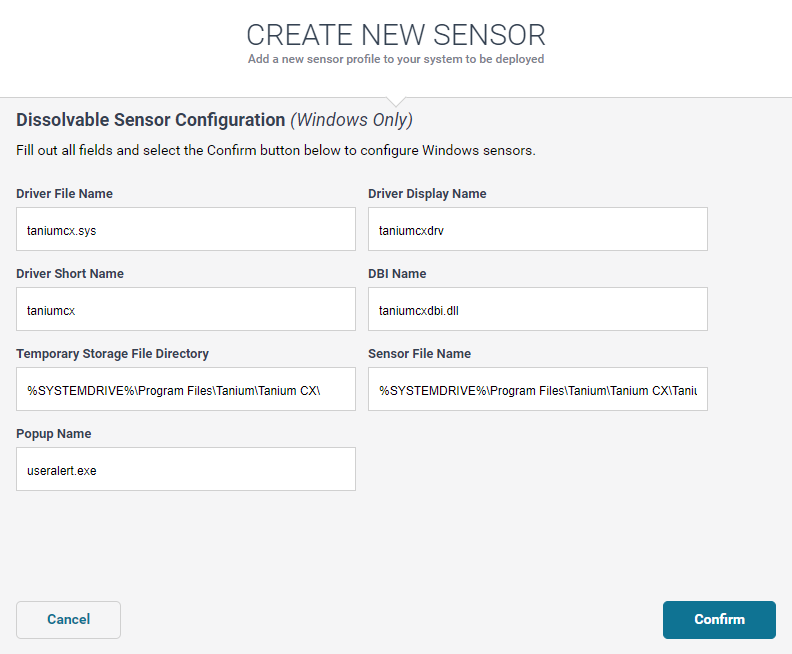
- Click Confirm
2. Create PERSISTENT Sensor Profile
- Create a new sensor profile with the following information:
| Setting | Value |
|---|---|
| Profile Name | PERSISTENT |
| Transceiver | https://<DIP_EXTERNAL_IP>:443 |
| Default Policy | DETECT+STREAM |
| Persistence | Persistent |
- Click the Advanced button under the Persistence section to modify the sensor’s installation parameters to obscure it from MCA:
| Setting | Value |
|---|---|
| Driver File Name | taniumcx.sys |
| Driver Display Name | taniumcxdrv |
| Driver Short Name | taniumcx |
| DBI Name | taniumcxdbi.dll |
| Persistent Storage File Directory | %SYSTEMDRIVE%\Program Files\Tanium\ |
| Sensor File Name | %SYSTEMDRIVE%\Program Files\Tanium\TaniumCX.exe |
| Sensor Display Name | TaniumSensor |
| Sensor Short Name | tsensor |
- Click Confirm
3. Create CVAH Sensor Profile
- Create a new sensor profile with the following information:
| Setting | Value |
|---|---|
| Profile Name | PERSISTENT |
| Transceiver | https://10.<X>.<Y+2>.200:443 |
| Default Policy | DETECT-ONLY |
| Persistence | Persistent |
- Click Confirm