Get GitLab Access
GitLab Access
- Visit https://code.levelup.cce.af.mil/
- Sign-in via CAC
- Click FAMS portal
- Click "System Authorization Access Request"
- Click the Apply button for "JCWA"
- Make sure request access for self is checked
- Click "Start a New One" button
- Personal Details and Organization details should be filled in already.
- Fill in the following details on "Type of access" tab
- Team Key > 262COS > Developer access
- JAWS access > Yes > User level
- Justification for access > "Access required to perform duties at the 262 COS."
- Sign on "Requester Signature" tab
- Verify "Supervisor" tab has appropriate approver
- Submit request
- Wait a few days and check your email
CLI access
- Once you get confirmation of being added to GitLab, sign in. If you do not have access to the Electric Eagle project, ask Ratliff to add you.
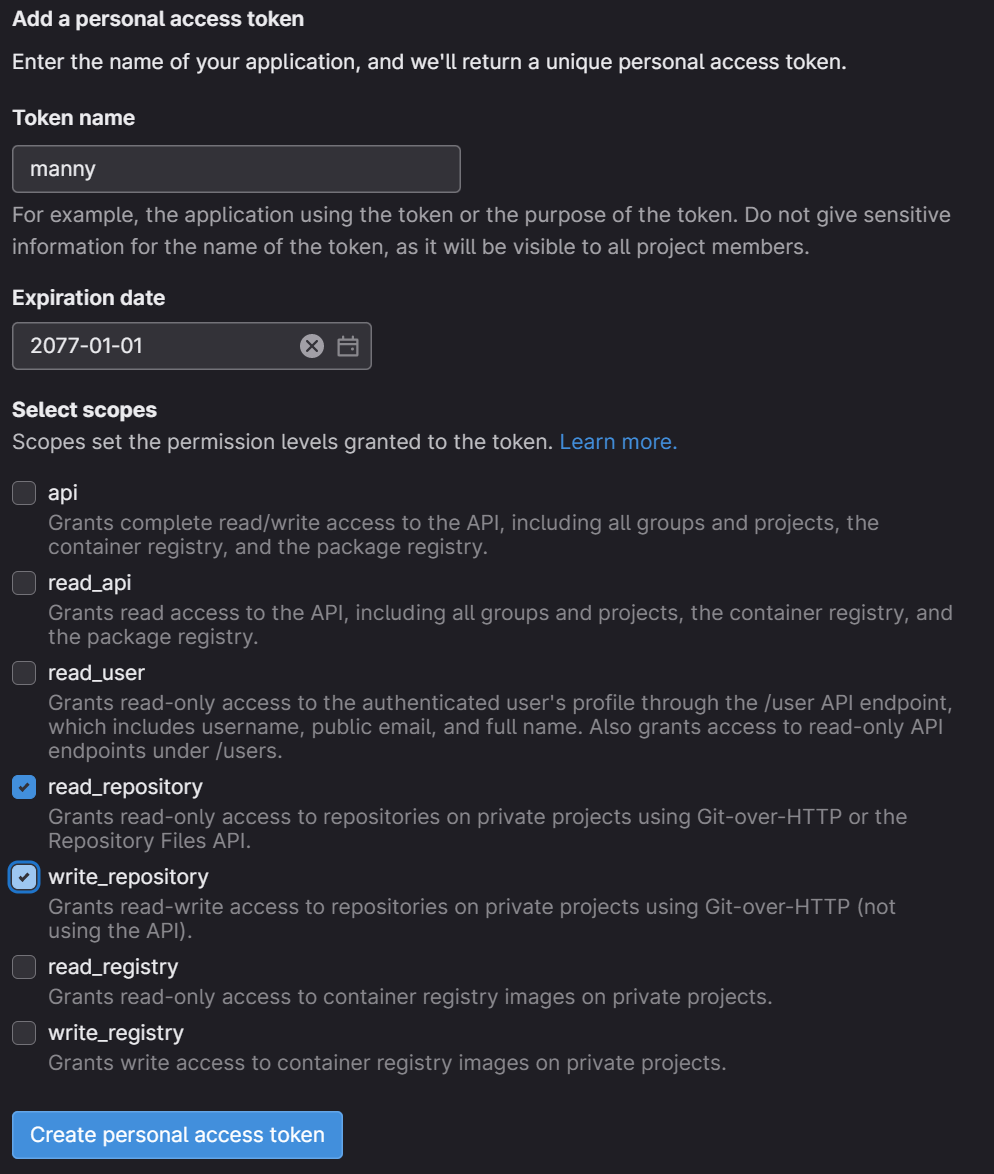
- From your user-settings, create a personal access token (PAT)
- Name it
- Select a reasonable expiration date
- Select
read_repositoryandwrite-repository - Click
Create personal access token
SAVE YOUR PAT for lateronce you click create, scroll up, copy and save the generated PAT. It's a surprise tool that will help us later!