Reconstruction Formatting
It is recommended to perform the following procedures in Excel, as Libre does not display formatting properly.
-
Open the TSV crewlog file in Excel
-
Download and open the Crewlog Template (can also be found in
//fileserver/Share/MISSION/04_DEBRIEFING/00_TEMPLATES) in Excel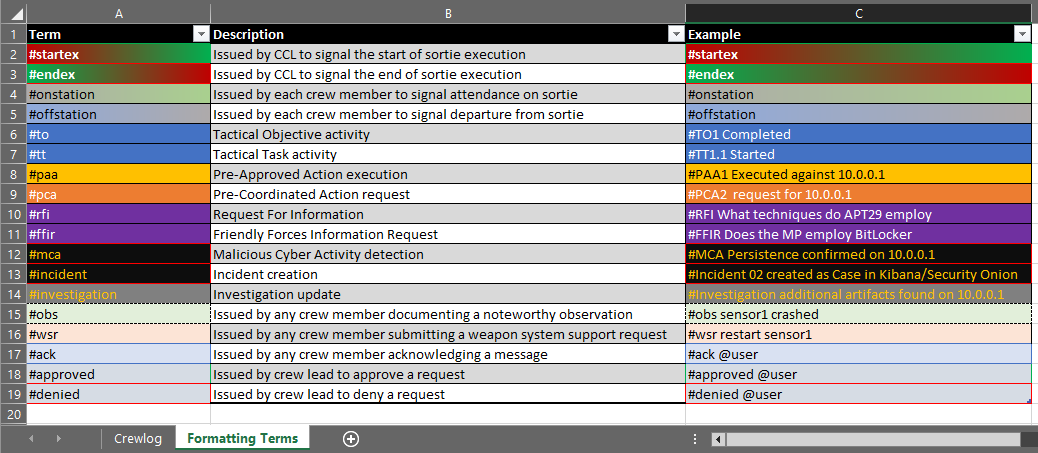
-
From the crewlog file, select the first (top-left) cell and press
[CTRL] + [SHIFT] + [END]to select all cells with data -
Copy the cells by pressing
[CTRL] + C -
Switch to the
Crewlog-YYYY.MM.DD (TEMPLATE).xlsxfile and select the first (top-left) cell of the Crewlog worksheet and paste the copied crewlog content by pressing[CTRL] + V

-
Sort the
CreateTimecolumn by Oldest to Newest and filter theCreateTimecolumn for the current day -
For better readability:
- Hide the
ModifyTimeandDeleteTimecolumns - Double-press
[CTRL] + Ato select the entire worksheet and expand all multi-line cells by double-clicking any row divider (between the row numbers)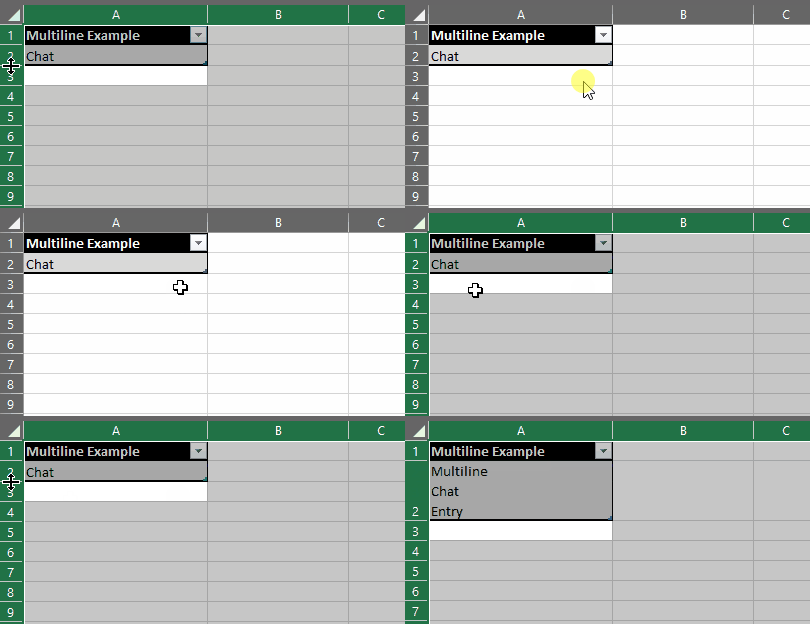
- Filter the
ChannelNamecolumn for only the channels relevant to the communication contracts
- Hide the
-
Save the file to the Fileserver
Shareunder//fileserver/Share/MISSION/04_DEBRIEFING/01_CREWLOGS/asCrewlog-YYYY.MM.DD.xlsx(replace with the current date)